
E-office software for paperless government offices
Move every file, dak and approval online. Our e-office systems give departments electronic files with noting and drafting, digital signatures, a complete movement history and pendency dashboards, configured to your office procedure.
An e-file with notes, signatures and movement history
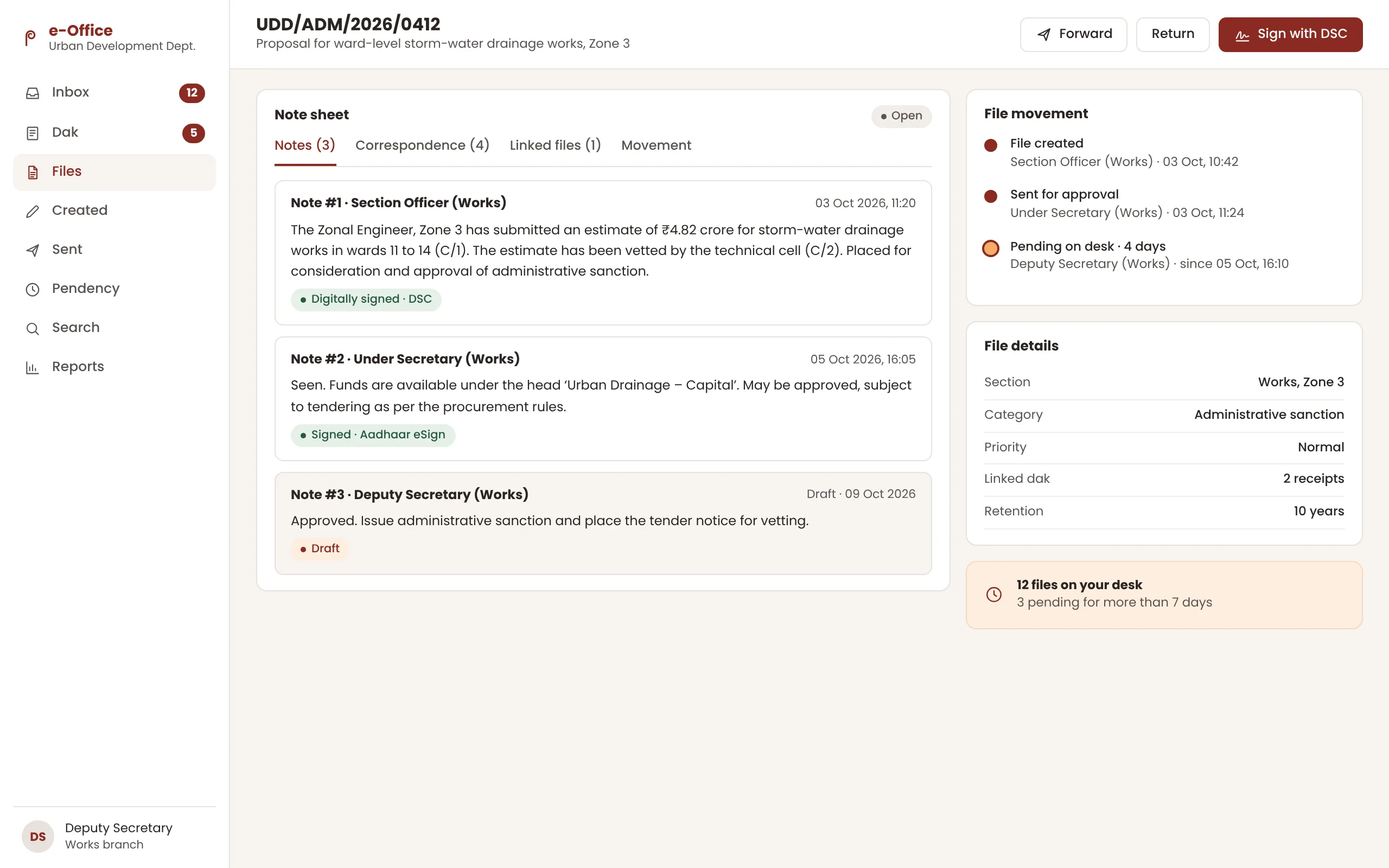
From paper files to e-files
Paper files travel slowly, go missing and make it hard to know who is holding a decision. An e-office system replaces the physical file with an electronic one: receipts are diarised as dak, notes are written and signed on screen, and every movement is recorded with date and time. Officers see what is pending on their desk, and senior officers see where work is stuck across the department.
We configure e-office around your existing procedure instead of asking staff to change how they write notes. Before recommending anything, we assess what you already use, including NIC eOffice where it is in place, and advise whether a custom build, an extension or an integration will serve you best.
What our e-office software includes
Electronic files
Create, number and open e-files with correspondence and notes on one screen, following your file numbering scheme.
Dak management
Diarise physical and digital receipts, scan and attach them, and route them to the right section in minutes.
Noting and drafting
Write notes and draft letters on screen, with version history, references and templates for standard communications.
Digital signatures and eSign
Sign notes and letters with Digital Signature Certificates or Aadhaar-based eSign through a licensed eSign service provider.
File movement and tracking
See where every file is, who sent it, how long it has been there and what action is pending.
Pendency dashboards
Section, branch and department views of pending files and receipts, with ageing reports for review meetings.
Where e-office software makes a difference
State secretariat departments
Replace paper files across sections and branches with a single electronic workflow.
District collectorates
Handle dak from tehsils, blocks and the public with clear routing and time limits.
Municipal corporations
Process internal approvals, tenders and council matters with a full audit trail.
PSUs and boards
Run board notes, approvals and correspondence on a secure, searchable system.
How we deliver e-office software
- 1
Office procedure study
We document how receipts, files and approvals move today, section by section.
- 2
Configuration
Hierarchy, roles, file heads, numbering and templates set up to match your office.
- 3
Pilot
One or two sections go live first, so that issues are fixed before wider roll-out.
- 4
Roll-out and training
Phased roll-out with hands-on training, a help desk and user guides in Hindi, Gujarati and English.
- 5
Migration and support
Scanning and indexing of legacy files where needed, followed by ongoing support.
Standards and compliance
What every e-office software engagement with P Intelligence follows.
- Configurable to the Central Secretariat Manual of Office Procedure and state office manuals.
- Digital Signature Certificates and Aadhaar eSign through a licensed eSign service provider.
- Role-based access with a complete audit trail of every view, edit, signature and movement.
- Record retention schedules applied to closed files.
Frequently asked questions about e-office software
What is e-office software?
E-office software replaces paper files with electronic files. Receipts are diarised as digital dak, officers write and sign notes on screen, and every movement of a file is recorded, so that work can be tracked and searched.
Can e-office work with digital signatures?
Yes. Officers can sign notes and letters with Digital Signature Certificates or with Aadhaar-based eSign provided through a licensed eSign service provider.
We already use NIC eOffice. Can you still help?
Yes. We start by assessing your current set-up and can build connected modules, dashboards or integrations around it, or advise on a custom system where your requirements differ.
How do you move old paper files into the system?
We scan and index legacy files in priority order, starting with active files, so that current work moves online first and older records follow.
How long does an e-office roll-out take?
A pilot in one or two sections can usually start within weeks of configuration. A department-wide roll-out is planned in phases, depending on the number of sections, users and legacy files.
Often combined with E-Office
Custom Software Development
Citizen portals, mobile apps, MIS dashboards and workflow systems designed around your department's processes, then supported after go-live.
Explore Custom Software Development Government SoftwareAI Software
Document reading, grievance classification, chat assistants and analytics that turn large volumes of citizen data into clear decisions.
Explore AI Software Citizen & Voter OutreachWhatsApp Messaging
Scheme updates, service notifications, chatbots and two-way citizen helpdesks for government departments on the WhatsApp Business Platform.
Explore WhatsApp Messaging
Planning e-office software?
Tell us about your department, office or campaign. A practice lead from our New Delhi or Ahmedabad team will reply with next steps.